Best Affiliate Marketing ProgramsHow to Join the Shopify Affiliate Program: 6 Steps to Qualify and Get Paid
How to Join the Shopify Affiliate Program: 6 Steps to Qualify and Get Paid
The short answer
The Shopify affiliate program lets creators, publishers and other online businesses earn commissions by referring new merchants to Shopify. It is free to join. You apply through the official program page, get approved, then share your unique referral link. When a referred merchant subscribes to a paid Shopify plan, you earn a commission, and recurring payments can continue to pay out while that merchant stays subscribed.
Some links on this site are affiliate links: if you buy through one, the site may earn a commission at no extra cost to you. More about this.
By the end of this guide, you will know whether you meet the eligibility rules, how to submit an application that is more likely to be approved, and how the commission and payout terms work as Shopify publishes them.
This guide walks through the same steps in order, so you can check each one before moving on.
- Eligibility rules: what Shopify looks for in an applicant and what can get a sign-up turned down
- Application steps: what to prepare before you apply and what to write in the form
- Referral link setup: how to get your unique link and use it correctly
- Commission structure: how one-time and recurring payments are described in the published terms
- Payout terms: when and how commissions are paid, and what affects the amount you receive
- Common mistakes: where new applicants usually go wrong
Each section sticks to the published program terms. Where the terms leave something open, the guide says so rather than filling the gap with guesses.
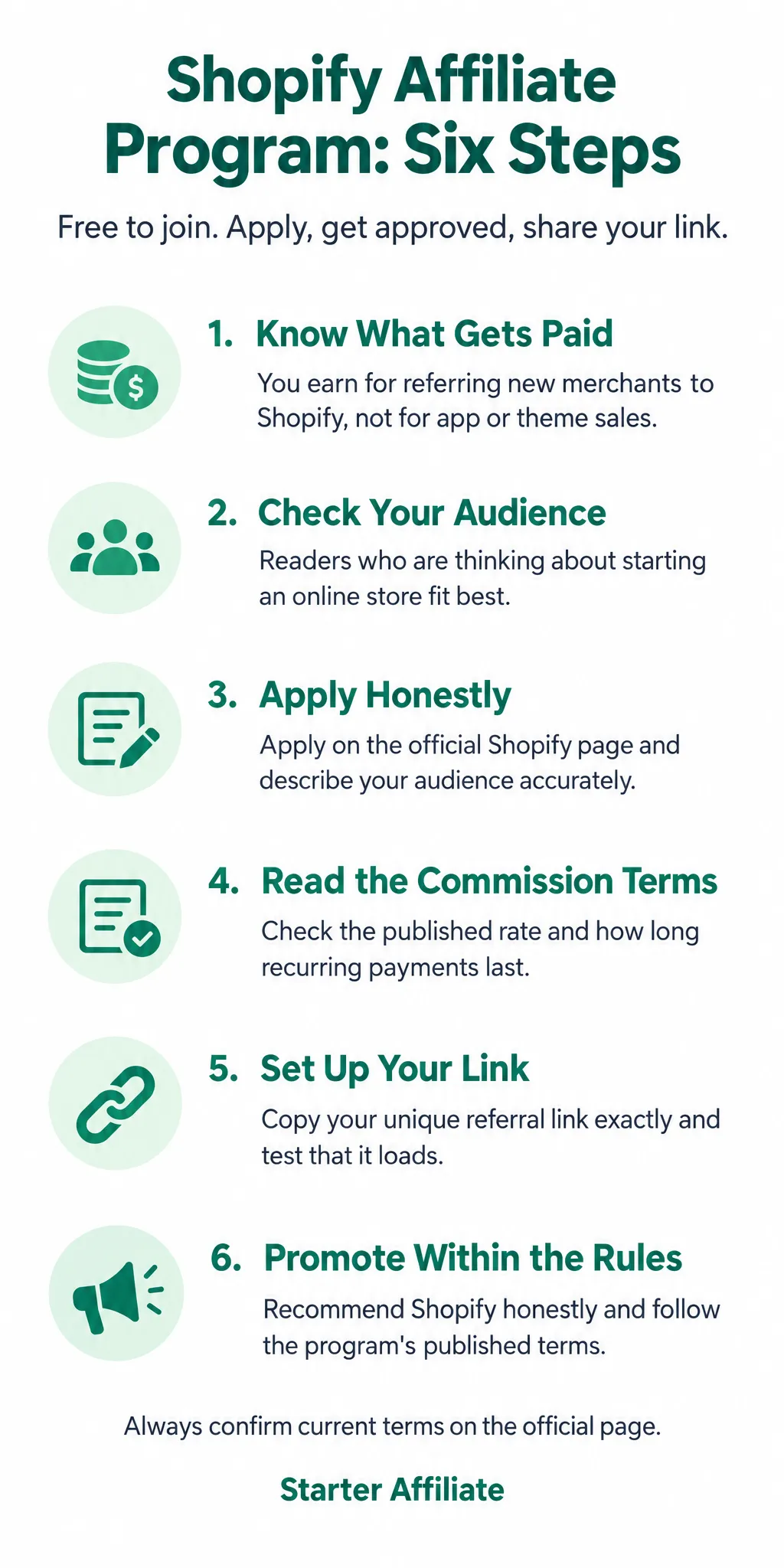
Quick reference: the six steps
| Step | What you do |
|---|---|
| Step 1 | Confirm the program pays for referring new merchants |
| Step 2 | Check your audience fits people starting a store |
| Step 3 | Submit the application with honest audience details |
| Step 4 | Read the published commission and recurring terms |
| Step 5 | Copy your referral link and test it |
| Step 6 | Promote honestly and follow the program rules |
Step 1: Understand What the Program Pays For
Before you apply, know what you will actually get paid for. The Shopify affiliate program pays commissions for referring new merchants to Shopify. It does not pay you for selling Shopify apps or themes. If your plan is to recommend a theme or an app in a blog post, that is a different arrangement, and you should check with the app or theme developer directly.
The Shopify Partner Program is a separate thing. It is aimed at developers and agencies who build stores or apps for clients. If you design sites for other businesses or build integrations, that program fits you better. If you mainly want to send people to Shopify through content, stay with the affiliate program.
Individual stores also run their own referral programs. A shop owner might offer a discount or a cut of sales to anyone who sends them customers. These are separate from the affiliate program. Their terms, payouts and sign-up steps are set by that store, not by Shopify.
Here is a quick way to sort it out:
- Do you want to earn by referring people to start a Shopify store? Look at the Shopify affiliate program.
- Do you build stores or apps for clients? Look at the Shopify Partner Program.
- Do you want to promote one particular shop's products? Check that store's own referral page.
For example, say you run a blog about small business tools. You write a guide on opening an online shop. That guide fits the Shopify affiliate program, because a new merchant signing up is the action being rewarded. A review of a single store's products would not.
[screenshot: the Shopify affiliate program landing page showing the description of what is paid]
Step 2: Check If You Qualify
Before you fill out an application, check whether you fit the program. It takes a few minutes and can save you a lot of time.
Shopify's affiliate program has accepted several types of applicants in the past. These have included creators, content publishers, course creators, commerce experts, and app partners. Find where you fit. If you run a blog or a channel and mostly talk about running a business, you are likely in the publisher category.
The bigger question is whether your audience is a good match. Shopify sells a platform for people who want to start an online store. The people most likely to buy through your link are those who are thinking about starting one. For example, say you run a blog that walks beginners through setting up a small shop to sell handmade candles. Your readers are close to the buyer Shopify wants. A blog about gardening tips with a few posts on selling plants online is a weaker fit.
To check your fit:
- List the main topics your site or channel covers.
- Note how many of your visitors or viewers are interested in starting or growing an online store.
- Ask yourself whether you would honestly recommend the platform to them.
Eligibility rules can change. Open the official Shopify affiliate program page and read the current requirements before you apply. Do not rely on rules you read in an older post, including this one.
[screenshot: the eligibility section on the official Shopify affiliate program page]
Example audience fit
| Type of site | Audience fit | Why |
|---|---|---|
| Blog on starting a small online shop | Strong | Readers are close to the buyer Shopify wants |
| Blog on gardening with a few plant-selling posts | Weaker | Few readers are thinking about starting a store |
Step 3: Apply to the Program
Once you know the program suits you, it's time to apply. Start on the official Shopify affiliate page, not a third-party site that claims to sign you up. The application is free, and you fill it in yourself.
Have these details ready before you begin:
- Your name, email address, and country
- The URL of your website, blog, or social profile
- A short description of your audience
- The main topics you cover
[screenshot: the Shopify affiliate application form with the profile and site fields visible]
Describe your audience and content honestly and specifically. Reviewers read this section closely. "I write about coffee for home brewers who buy beans online" tells them far more than "I cover lifestyle topics for everyone."
For example, if your blog reviews budget kitchen gadgets for first-time renters, say exactly that. Don't claim a large following you don't have.
After you submit, expect a review period before you hear back. You may be declined. If that happens, don't panic. Tidy up your site, make sure your pages load and your content is original, add more useful material, and reapply later.
Step 4: Understand How Commissions and Recurring Payments Work
Before you promote anything, check how the money is calculated. Shopify's affiliate program pays a commission on subscription payments from the merchants you refer, and the percentage is stated in the program's published terms. Those terms are the source to trust, so read them yourself rather than relying on a summary, including this one.
Recurring commissions are the part that matters most. If a merchant you referred stays on a paid plan, you keep earning from their payments for as long as they remain subscribed. You are not paid once and finished.
Here is a simple example with made-up numbers. Say a merchant pays 30 in month one, and you earn 10 percent. You receive 3 for that month. If they stay subscribed, you receive another 3 each month after that. Your income grows as your referrals stay on paid plans, and it shrinks when they cancel.
To check the live rate for yourself:
- Open the affiliate program's terms page and find the commission section.
- Note the percentage, how long recurring payments last, and any conditions.
- Write those details down so you can compare them later.
[screenshot: the commission section of Shopify's published affiliate terms, with the rate and recurring language visible]
Step 5: Set Up Tracking and Get Paid
Once you are approved, the program gives you a unique referral link. This link is how Shopify knows a visitor came from you, so it is the first thing to set up correctly.
What you need before you start
- Your approved affiliate account login
- A page, post, or profile where you plan to share the link
- A note of your payout details, such as your bank or PayPal information
Do this:
- Log in to your affiliate dashboard and find your referral link. Copy it exactly. Do not shorten it or edit the code, or the referral may not be attributed to you.
- Put the link on your page, in your post, or in your email. Use it only for the product or offer you are recommending.
- Open the link in a private browser window and check that it loads the Shopify page. This confirms the link works.
[screenshot: affiliate dashboard showing the unique referral link and copy button]
Check the terms, not your memory. The cookie window (how long after a click a sale still counts) and the payout method can change. Read the current published terms on the official affiliate pages and note the dates you read them.
Confirm the threshold and timing. Find the minimum payout amount and the payment schedule on the official pages. Do not plan a payout date until you have confirmed both.
For example, say you write a review and share your link. If a reader clicks it, the referral is credited to you only if the cookie window in the terms still covers their purchase.
Step 6: Promote Honestly and Stay Within the Rules
Once you are approved, the way you promote matters as much as the links you use. Programs have rules, and breaking them can get your account closed, even if your intentions were good. The safest approach is also the one that tends to work best: write useful content for people who actually need Shopify.
Start with a clear picture of who Shopify suits. It is built for people who want to run an online store, whether they sell physical goods, digital products, or services. It is less suited to someone who wants a quick side income with no store at all. Say that plainly in your content. A review or tutorial that explains what a store needs, what it costs to run, and where it fits works better than a post that promises results.
Avoid earnings claims. Do not write "make $5,000 a month with Shopify" or suggest a specific income. Describe what the program pays in general terms, and check the published terms for the current figures.
Before you run any paid ads, read the program's rules on bidding and brand terms. Many programs limit whether you can bid on the brand name in search ads, and some restrict specific ad copy. Check these terms directly rather than relying on a summary.
In my view, an audience already asking how to start an online store is a better fit than a general audience. That is my opinion, not something I have tested.
Here is a practical starting point:
- Write one tutorial: "How to choose between a hosted store and a self-built one"
- Add your affiliate link where it fits naturally, not in every paragraph
- Add a short note explaining what you recommend and why
- Re-read the program terms before publishing anything with paid promotion
[screenshot: the program's terms page with the bidding and brand-use sections highlighted]
Frequently asked questions
Is Shopify an affiliate program?
Yes. Shopify runs an affiliate program that pays people who refer new merchants to its ecommerce platform. You sign up as an affiliate, get a unique referral link, and earn a commission when someone you refer starts a paid plan. Approval is not automatic, so you will usually need to apply and meet the stated requirements first.
How much do Shopify partners get paid?
Shopify pays affiliates a commission on the subscription fees of the merchants they refer, and the exact rates and payout terms are set out in the program's published terms. Those terms can change, so check the current figures on the official affiliate page before you rely on them. Payouts are typically made after a referred merchant pays for their plan.
What is the best platform for affiliate marketing?
There is no single best platform for everyone. Most beginners start with a blog, a YouTube channel, or a social account, because these let you publish reviews and recommendations that link to affiliate offers. The right choice depends on whether you prefer writing, video, or short posts, and on which audience you already have.
What are the best affiliate marketing apps for Shopify?
Affiliate marketing apps for Shopify are tools that help merchants run their own affiliate programs, such as tracking referrals and paying partners. If you want to promote Shopify itself, you do not need one of these apps. You join Shopify's own affiliate program and use the referral links it gives you. Apps are mainly useful to store owners, not to affiliates.
Do I need a website to join the Shopify affiliate program?
Shopify's affiliate program expects applicants to have an established way of reaching potential customers, such as a website, blog, or social audience. The published requirements describe what counts and what the review looks for. Read the current eligibility rules on the official page before applying, since requirements can be updated.
Conclusion
Joining the Shopify affiliate program takes a few clear steps, and none of them are hard once you know the order.
Which step will you try first: checking eligibility, reading the payout terms, or setting up your referral link?
Start with the requirements, because they decide whether your application is worth making.
When you are ready to apply, go straight to the source and read the current terms there.